


Lambda(Node.js)からDynamoDBのテーブルを作成する
Lambda(Node.js)からDynamoDBのテーブルを作成する
Lambda(Node.js)からDynamoDBのテーブルを作成してみます。
以下を参考にしました。
AWS SDK for JavaScript v2
var AWS = require('aws-sdk');
AWS.config.update({
  region: "us-west-2"
});

var dynamodb = new AWS.DynamoDB();

var params = {
  TableName : "Movies", // テーブル名
  KeySchema: [
    { AttributeName: "year", KeyType: "HASH"}, //Partition key
    { AttributeName: "title", KeyType: "RANGE" } //Sort key
  ],
  AttributeDefinitions: [
    { AttributeName: "year", AttributeType: "N" },
    { AttributeName: "title", AttributeType: "S" }
  ],
  ProvisionedThroughput: {
    ReadCapacityUnits: 10,
    WriteCapacityUnits: 10
  }
};
exports.handler = (event, context, callback) => {
  dynamodb.createTable(params, function(err, data) {
    if (err) {
      console.error("Unable to create table. Error JSON:", JSON.stringify(err, null, 2));
    } else {
      console.log("Created table. Table description JSON:", JSON.stringify(data, null, 2));
    }
  });
};
regionを”us-west-2″(米国西部オレゴン)に指定しています。
endpointは指定していません。
「テスト」をクリックします。
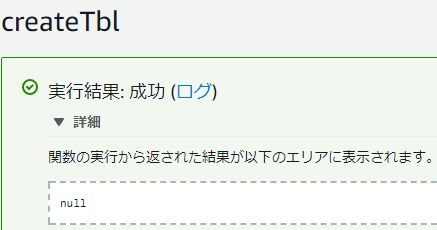
ログには「Created table.」と出力されています。
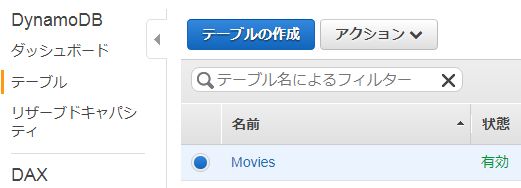
テーブルを確認しようとすると、見つかりませんでした。

バージニア北部になっていたので、米国西部(オレゴン)に変更します。
テーブルが作成されていることが確認できます。
AWS SDK for JavaScript v3
import { DynamoDBClient, CreateTableCommand } from '@aws-sdk/client-dynamodb'

export const handler = async(event) => {
  const client = new DynamoDBClient({ region: 'ap-northeast-1'})
  const command = new CreateTableCommand(
    {
      'TableName': 'Movies',
      'KeySchema': [
        { AttributeName: "year", KeyType: "HASH"}, //Partition key
        { AttributeName: "title", KeyType: "RANGE" } //Sort key
      ],
      'AttributeDefinitions':[
        { AttributeName: "year", AttributeType: "N" },
        { AttributeName: "title", AttributeType: "S" }
      ],
      'BillingMode': 'PAY_PER_REQUEST'
    }
  )
  const data = await client.send(command)
  console.log(data) // ログ出力
  const response = {
      statusCode: 200,
      body: JSON.stringify(data.Items)
  }
  return response
}
作成されました。

参考サイト

ERROR: The request could not be satisfied

docs.aws.amazon.com

KHI入社して退社。今はCONFRAGEで正社員です。関西で140-170/80~120万から受け付けております^^
得意技はJS(ES20xx),Java,AWSの大体のリソースです
コメントはやさしくお願いいたします^^
座右の銘は、「狭き門より入れ」「願わくは、我に七難八苦を与えたまえ」です^^


コメント